Transparent method
How the concrete volume calculator handles each shape
Each shape uses its own geometry rather than an average thickness forced onto every pour. Rectangular volume multiplies length, width, and thickness. Round volume uses diameter and height. Tapered volume averages two parallel widths in one cross section, then multiplies by perpendicular height and a constant section length.
- 01
Match the solid to the selected shape
Use Rectangular for a solid with uniform length, width, and thickness. Use Column or round for a full cylinder with constant diameter. Use Tapered section only when the same trapezoidal cross section continues along the entered length. A cone, curved channel, or changing longitudinal section requires another model.
- 02
Enter the dimensions with their units
Measure inside the forms or use the dimensions in approved project information. Keep each unit attached to its number: a diameter in inches can be combined with a height in feet because the calculator normalizes both before calculation. Tapered height is perpendicular to the parallel widths, not the sloping side length.
- 03
Check one piece before repeating it
The result shows the volume of one piece before the identical quantity is accumulated. Quantity must be a positive whole number. If dimensions differ between pieces, run a separate calculation for each design and keep the unrounded results rather than averaging unlike components into one nominal shape.
- 04
Separate net geometry from allowance
The default allowance is 0%. Selecting another percentage changes the order scenario without changing the net headline volume. That separation helps you compare the result with the drawing and later explain any extra material requested for field conditions. This page does not apply supplier increments or minimum orders.
| Output | Formula |
|---|---|
| Rectangular | length × width × thickness × quantity |
| Column or round | π × (diameter ÷ 2)² × height × quantity |
| Tapered section | ((top width + bottom width) ÷ 2) × height × length × quantity |
| Order volume | net volume × (1 + allowance ÷ 100) |
Field context
Read the form geometry before entering dimensions
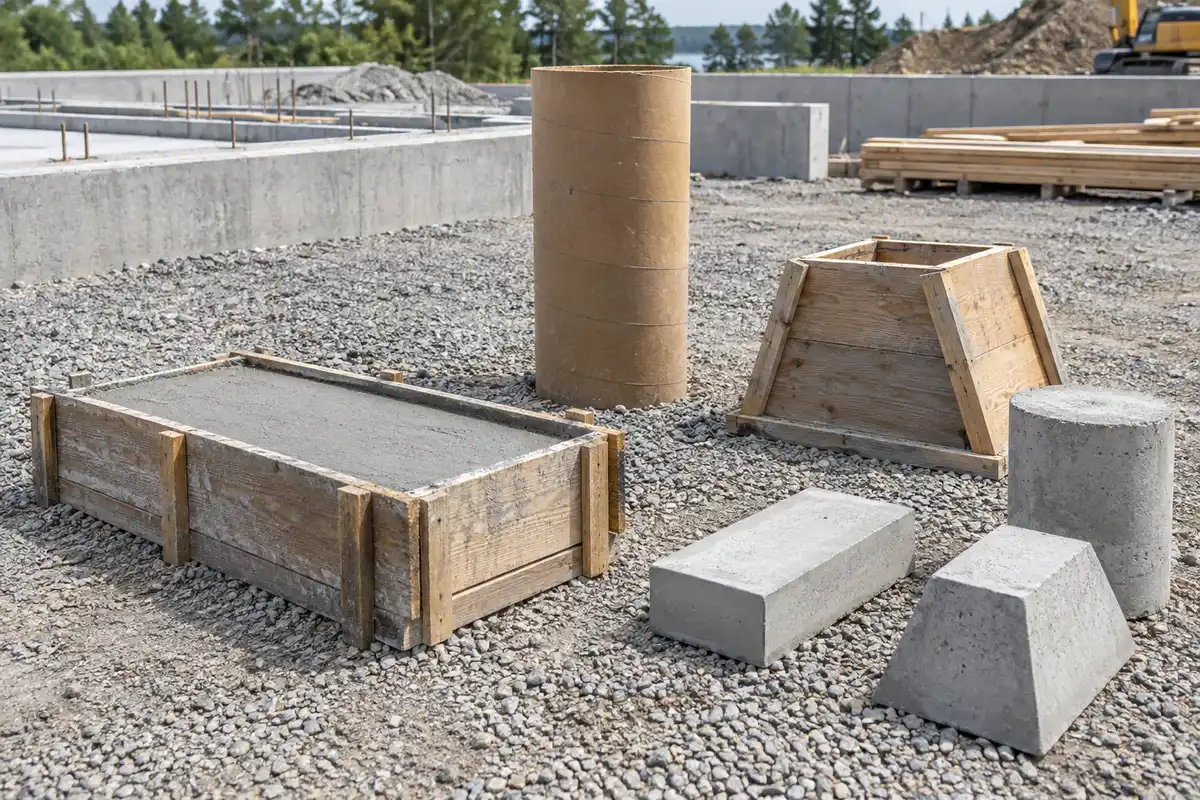
The concrete volume calculator distinguishes a rectangular prism, a cylinder, and a constant trapezoidal prism. The photograph provides a visual reminder that the cross section matters: an outside bounding rectangle can overstate a tapered piece, while using a radius as the entered diameter understates a round piece.
The molds and components are illustrative, not recommended construction details. The calculator does not choose dimensions, wall thickness, reinforcing steel, base preparation, or support. Use project information to identify the actual concrete boundary, then choose a geometry that represents that boundary without hiding voids or overlaps.
Check the arithmetic
Worked example: two identical tapered sections
Choose Tapered section with a top width of 2 ft, a bottom width of 4 ft, a perpendicular height of 3 ft, and a length of 6 ft. The average width is 3 ft, the cross-sectional area is 9 ft², and one section contains 54 ft³.
Two identical sections contain 108 ft³, exactly 4 yd³, or 3.058219 m³. With a selected 10% allowance, the order scenario is 118.8 ft³, or 4.40 yd³. The headline remains 4.00 yd³ because it describes the net shape rather than the adjusted order scenario.
This concrete volume calculator example assumes the trapezoidal cross section stays constant for the full 6 ft length. It is not the formula for a frustum that tapers in both plan directions. If the section changes along the length, split the geometry using a suitable documented method before combining results.
Use the result correctly
Three checks that keep geometry interpretable
01 Use diameter for the round branch
Diameter spans the full circular section through its center. The round branch calculates the radius internally. Entering a radius into the diameter field changes the area substantially, so compare the dimension label with your drawing and use the single-piece result as a reasonableness check before repeating it.
02 Keep tapered widths in the same cross section
Top and bottom widths must be parallel edges of the cross section. Either may be zero for a triangular cross section, but both cannot be zero. Height is the perpendicular separation, and length is the direction in which that unchanged section extends. A slope length is not a substitute for height.
03 Handle voids and intersections separately
This concrete volume calculator evaluates solid shapes. It does not automatically deduct hollow centers, openings, embedded items, or overlaps between intersecting parts. Document each component and deduction outside this single-shape calculation, then carry a reconciled net quantity into the appropriate ordering tool.
Sources and assumptions
Reference record
- NRMCA CIP 8 — Discrepancies in Yield — the existing verified authority record for this calculation task. CIP 8—Discrepancies in Yield, revised 2016; US; checked .
- NIST Handbook 44, Appendix C — U.S. customary and metric volume relationships. NIST Handbook 44—2026, Appendix C; US; checked .
The existing NRMCA measurement guidance and NIST conversion record retain their recorded review dates. Standard geometry is calculated by the shared shape functions at full precision. No new source, project dimension, allowance recommendation, or supplier rule has been introduced for this page.
Questions before ordering
Concrete Volume Calculator FAQ
How is this different from the slab calculator?
The slab page focuses on one rectangular slab design and product-specific bag equivalents. This concrete volume calculator adds cylindrical and tapered geometry and reports volume units without a bag count. Use it when choosing the correct shape formula is the central task.
How is this different from the cubic-yard conversion page?
The conversion page accepts a known volume and can apply a supplier-confirmed order increment. This page starts from shape dimensions and calculates the geometry itself. It shows equivalent cubic feet, yards, and meters while keeping any chosen allowance separate from net volume.
Can I calculate a triangular section?
Yes, when the triangular cross section is constant along the entered length. Choose Tapered section and set either top or bottom width to zero. The other width, perpendicular height, and length must remain positive. It does not represent a cone or pyramid.
Can I repeat round or tapered pieces?
Yes. Enter the positive whole-number quantity of identical pieces. One-piece cubic feet remain visible for checking, and the total uses unrounded values. Calculate different diameters, heights, widths, or lengths separately instead of using the quantity field to conceal those differences.
Does allowance change the displayed net volume?
No. Net cubic feet, cubic yards, and cubic meters always describe the entered geometry. The allowance changes only the separately labeled order scenario. It defaults to zero, and no percentage is presented as the correct choice for all forms or placement conditions.
Planning boundary
What this result does not decide
Geometry and allowance scenario only. This concrete volume calculator does not design a structural element, select dimensions, verify formwork, deduct hidden voids, or confirm an order quantity. Check measurements, shape assumptions, repeated counts, project specifications, and placement conditions before using the result for material planning.